macOS Workspace
Org2 Workspace is the native macOS client for an Org2 corpus. This alpha Swift Package lives in apps/macos/Org2Workspace and uses the same parser and CLI output as the rest of Org2. It does not maintain a private database.
The app is currently best understood as a local workspace shell for dogfooding the product direction: global capture, durable run and approval review, agenda review, file and knowledge navigation, search, compiler-generated HTML reading, native source editing, meeting capture, data notebooks, OpenClaw handoff, knowledge-node creation, and crypt workflows over normal files.
On first launch, a guided empty state offers Open an existing corpus, Create a new corpus, or Create a shared team corpus. Opening accepts an existing folder of Org/Org2 files without migration. Creating asks for an empty folder, writes a portable personal or shared identity in org2.json plus an inbox and welcome note, creates notes/, daily/, views/, compiled/, and workflows/, then opens the welcome note. It refuses to initialize a non-empty folder so existing files are never silently overwritten.
Screenshots
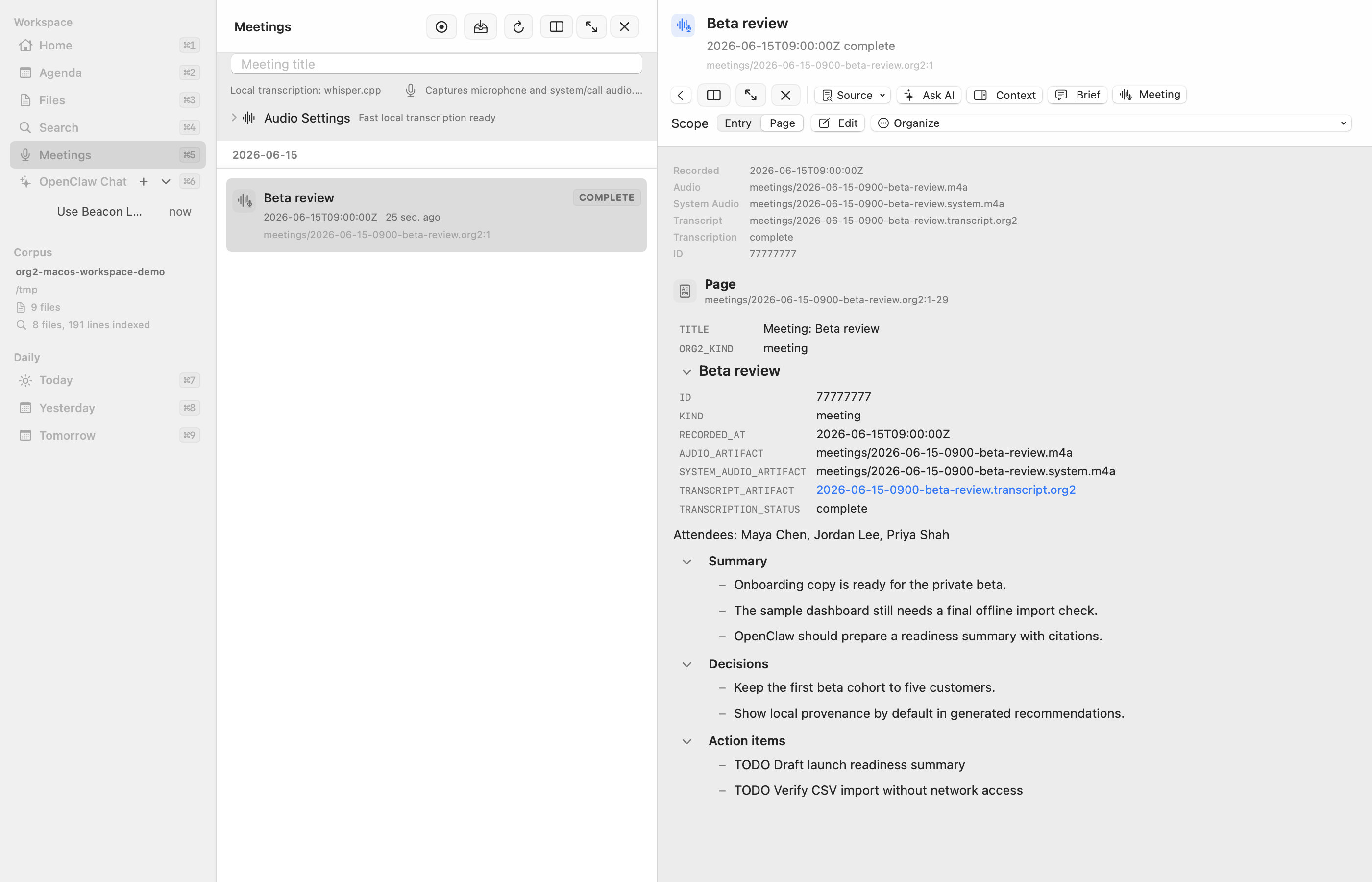
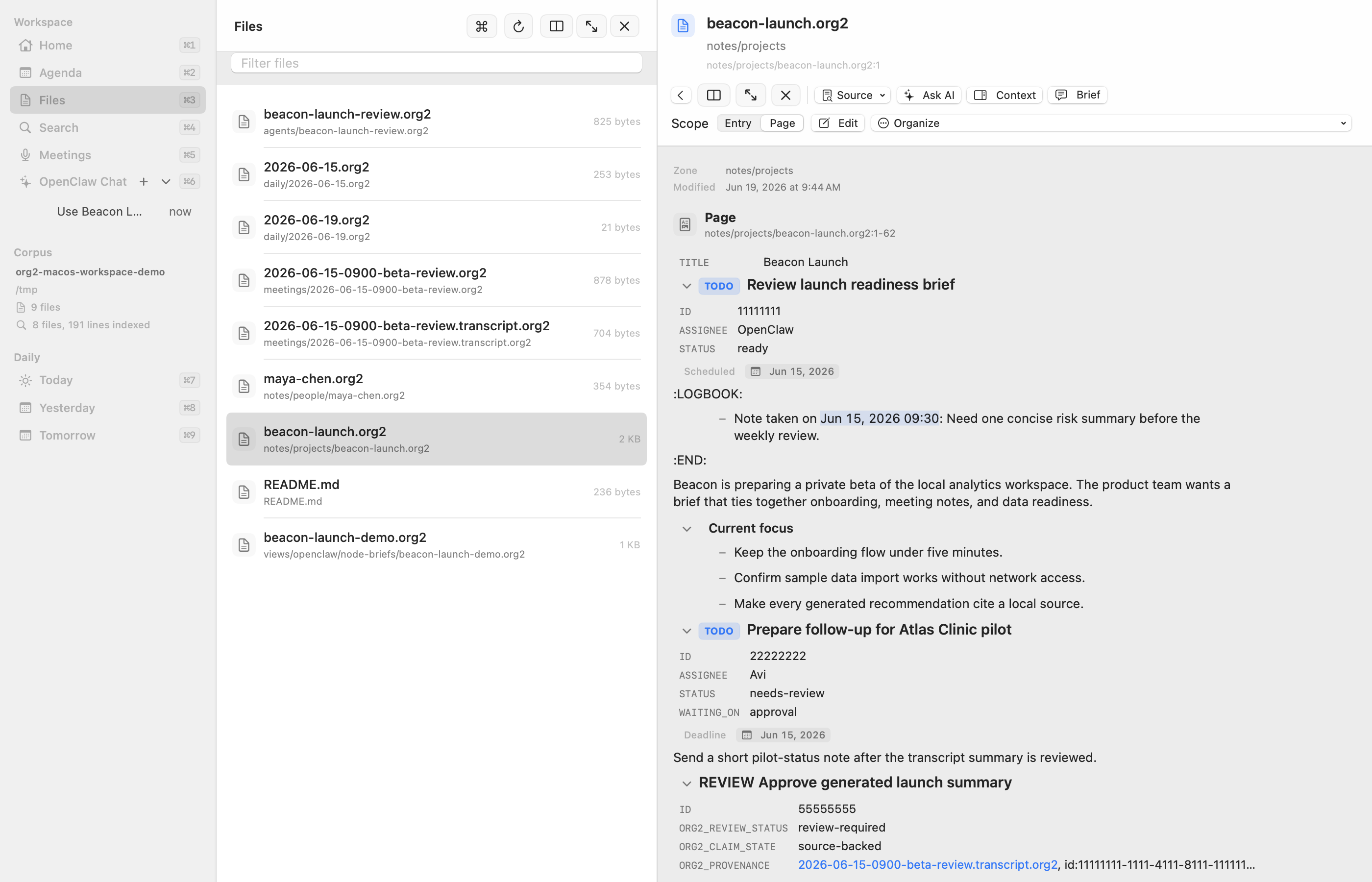
These screenshots are captured from the synthetic corpus in examples/macos-workspace-demo so public docs never depend on private notes.
Current surfaces
The resizable sidebar is navigation-first. Its primary rows cover Home, Agenda, Files, Agent Work, Meetings, and Sources; Search is the compact icon in the header, while Daily notes, pinned files, and OpenClaw chat have their own sections. A small monospaced asterisk marks the current row, echoing Org heading syntax without turning the native app into a terminal theme. The same restrained visual grammar appears in rendered heading markers and compact structural labels, while prose and controls retain the native system face. Every fixed destination has a keyboard shortcut, but the shortcut badges stay hidden until Command is held. The sidebar can grow to one quarter of the window width. Files pinned from the Files list or an open document's File menu appear in a personal, per-corpus Pinned section for quick return without changing the corpus itself. Only actionable counts, such as pending review or unread-chat state, appear beside navigation rows. The single-window app uses a compact, titleless native toolbar and disables macOS window tabs because navigation state is already shared within the workspace.
The compact corpus switcher at the bottom remembers mounted local paths without turning navigation into a corpus dashboard. It exposes the active corpus name, switching, mounting, creation, and forgetting; paths, identity metadata, file counts, and indexing status stay out of the persistent sidebar. Switching is blocked while an edit or refresh is active, resets corpus-specific UI state, and refreshes all views from the destination. An AI chat turn already in flight continues against its originating corpus and saves its reply there while the user switches away or back; the destination corpus never inherits that turn's context or output. Agenda and text Search have This Corpus and All Corpora read scopes; combined rows show their corpus and activate it before opening. AI chat defaults to the current corpus, while Org2 Workspace → Settings… can authorize read access to every loaded corpus for future turns. Additional corpora stay read-only and every preview/apply remains scoped to the turn's active corpus. Remote OpenClaw path mappings are stored per corpus so a switch cannot reuse another corpus's remote root. See Shared corpora and collaboration.
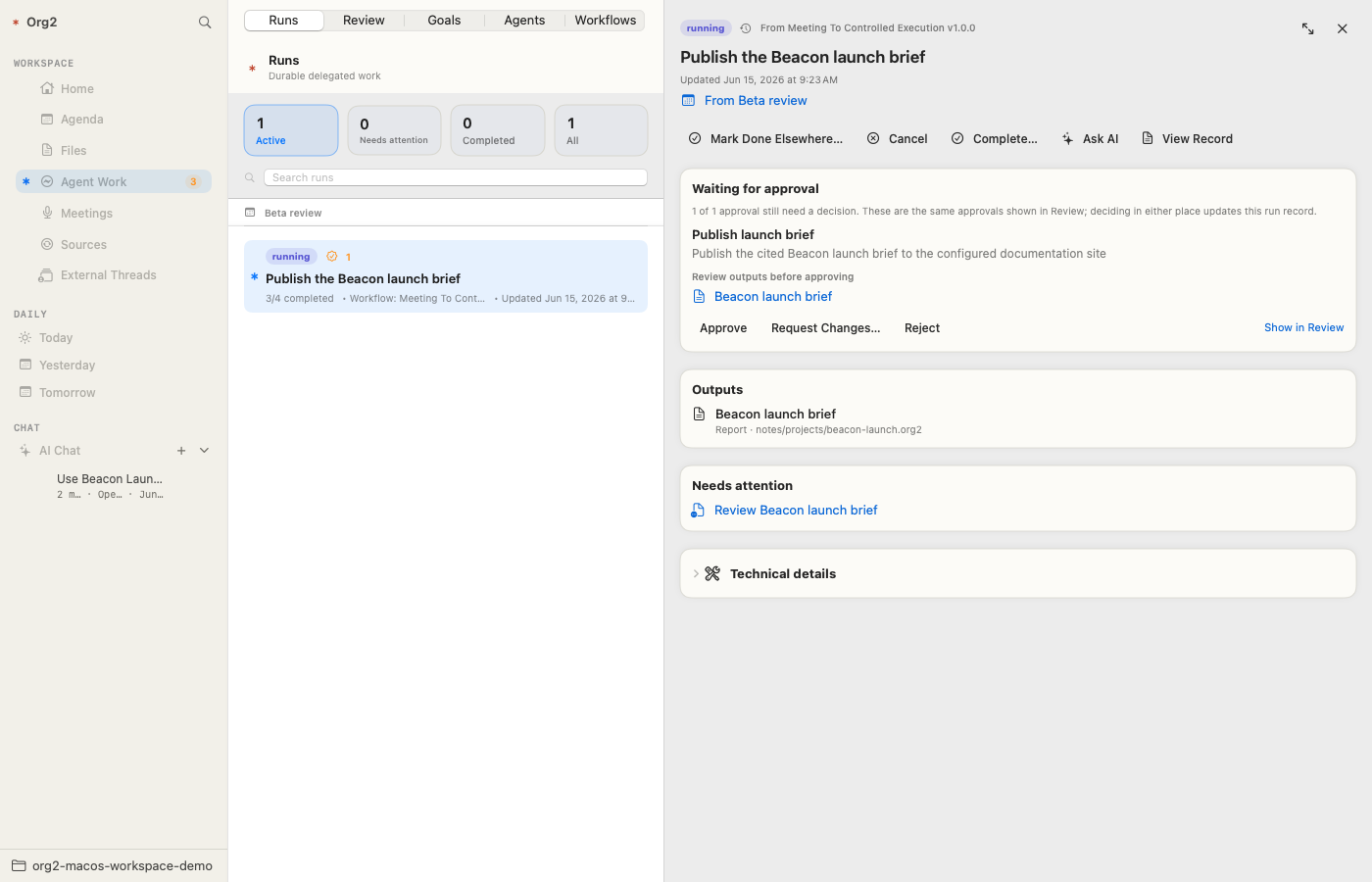
The Agent Work Review lane shows one writable decision per approval boundary. A heading linked by ORG2_RUN_ID to an unambiguous pending run approval is treated as a derived projection and omitted from the queue; the canonical run approval remains the only action. The same rule collapses legacy headline tasks or older durable approvals that point at one Gmail provider draft. Deciding the canonical item from either Review or Runs updates that run record, supersedes older pending provider copies, and closes dedicated duplicate review runs, so the action clears from both surfaces.
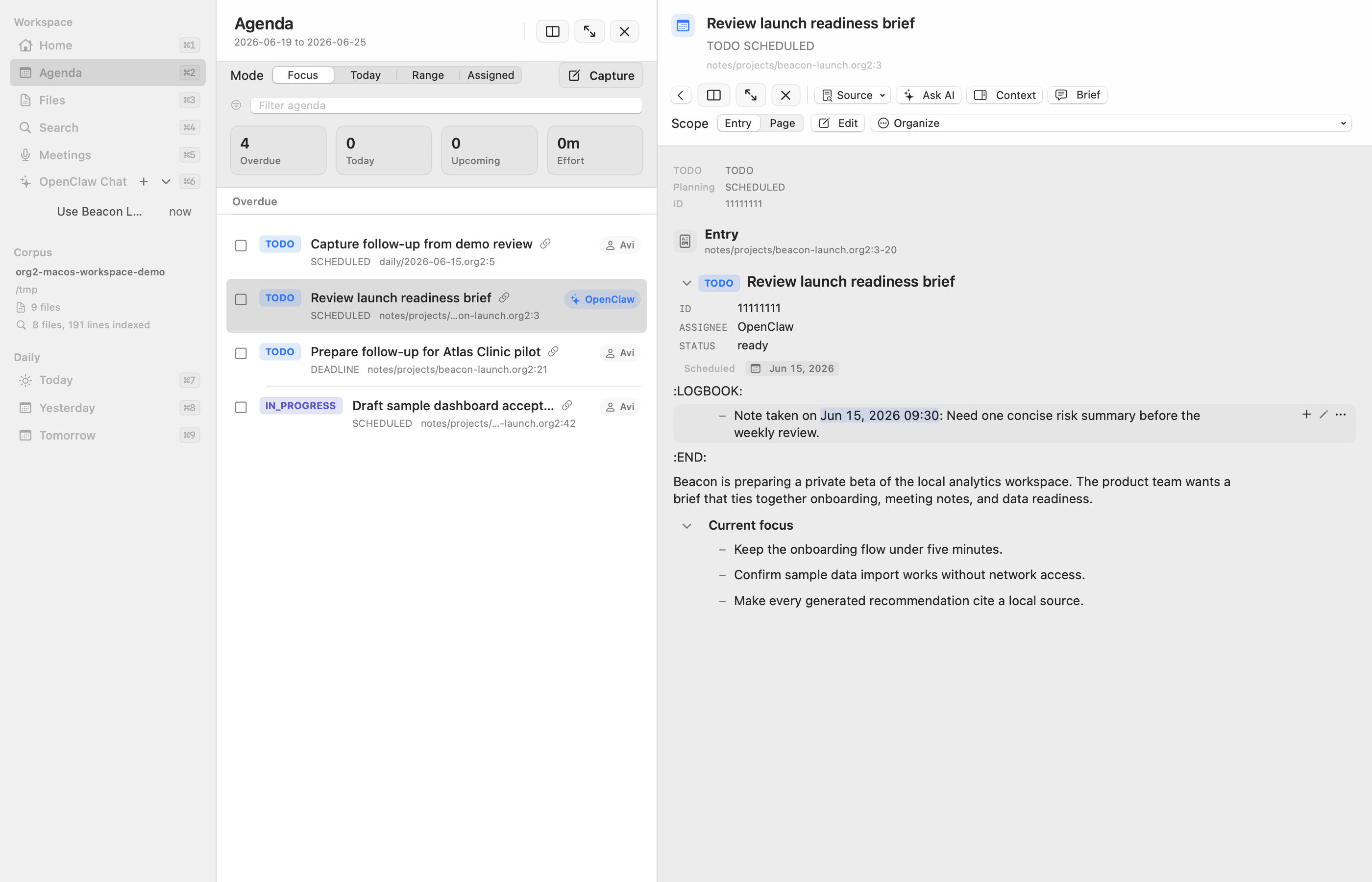
Agenda :: review scheduled/deadline work across the active corpus or all mounted corpora, filter items, switch agenda modes, mutate active-corpus TODO/planning state, and open the selected item in the detail pane. Selection and scrolling update immediately; expensive read-preview work is canceled and briefly coalesced while selection is moving, and backlinks are loaded only while the context pane is visible.
Agent Work :: use the Runs tab to see active, completed, blocked, failed, and approval-needed durable agent runs. Search filters the selected run scope across goals, workflow and owner metadata, context, plans, outputs, approvals, validation, comments, and outcomes; the Review tab has the same quick search pattern for every pending decision, and
Command-Ffocuses the search field on the visible tab. Run approvals in Needs attention and Review share the canonicalRUN_ID/APPROVAL_IDand provider decision key: both surfaces submit the native approval fingerprint through the same CLI operation, and the run detail can jump directly to its review item. Older provider-draft projections are canceled as superseded rather than treated as approved. Sync-conflict or backup files beside.org2/runs/RUN_ID.org2are never treated as a second authoritative run, so stale copied status and approval data cannot disagree with the canonical detail. Each decision is item-scoped: approving, rejecting, or canceling one review removes only that exact item, and unrelated approvals in the same run remain pending. Once the current boundary is fully decided, the run returns torunningand OpenClaw continues it exactly once, performing approved actions while excluding rejected or canceled ones; older standalone runs without stored session correlation open a new continuation session instead of remaining approved but inert. A recoverable running boundary also exposes Send Approved Draft for provider drafts, or Continue Approved Work for other protected actions, so the same idempotent continuation can be triggered manually. Request Changes… remains deliberately different: it requires concrete feedback, saves it as the durable revision decision note, and returns an eligible correlated workflow to OpenClaw to prepare replacement review material on the same run; it does not authorize the protected action. Discuss remains nonbinding and leaves the approval pending. Its dialog always offers a new AI thread and only offers an existing destination when a thread is selected, naming that thread explicitly. Standalone parser-backed headline approvals also appear in this one queue, but are explicitly file-backed rather than run-backed and continue to use the ordinary TODO/property workflow and OpenClaw discussion path. Mark Done Elsewhere… on a standalone approval marks its headingDONEand records an external-completion timestamp and note. Rejecting either kind requires an audit reason. Filesystem events refresh visible durable runs, workflows, and review items after a short coalescing delay; a once-per-minute check remains as a low-cost reconciliation fallback while the app is active. Hidden run/review views are marked stale and refresh when opened instead of consuming resources in the background. Needs attention is an actionable projection rather than an append-only crash log: queued and running work stays in Active even when its durable record retains warnings or review metadata for a later boundary; completed and cancelled runs likewise stay out of the scope; repeated failed executions of the same goal collapse to the latest attempt; and a newer running, completed, or cancelled execution removes the older failures from that scope. All retains every durable record. Resume reactivates a blocked run, Dismiss keeps a failed record while marking it cancelled, and Mark Done Elsewhere… is available from every run that is not already completed and directly from every pending approval. After the user records where or how its outcome was achieved, a run-backed action retains pending approvals and unreviewed artifacts as historical evidence, removes their rows from Review, and shows them in the finished run detail as non-actionable history. This records Org2's durable outcome but does not stop work that may still be running in another system. Meeting-derived runs are grouped by their explicit source-meeting context, while every outcome keeps its own human-readable goal and status; the run detail links back to the meeting and between related outcomes. The run list uses the workspace's standard detail pane instead of creating a nested third column; selecting an output replaces the run detail with that file, and Back returns to the run. A completed run leads with its plain-language outcome, highlights, next actions, and readable output names; retained warnings and review metadata remain visible in its detail, while the plan, citations, routine validation, risk, and machine metadata are collapsed under Technical details. Skipped steps are labeled separately instead of counted as completed, and repeated validation attempts collapse to the latest result. Runs created from an existing workflow show that provenance and do not offer a duplicate Save as Workflow action; a completed one-off run may be turned into a draft workflow through the explicitly described Create Reusable Workflow… confirmation. The Workflows tab lists the canonical files underworkflows/, opens them in the normal Org2 document/source editor, collects inputs for Run Now, validates them, manages draft/active/paused state, and reconciles schedules with OpenClaw.Files :: scan
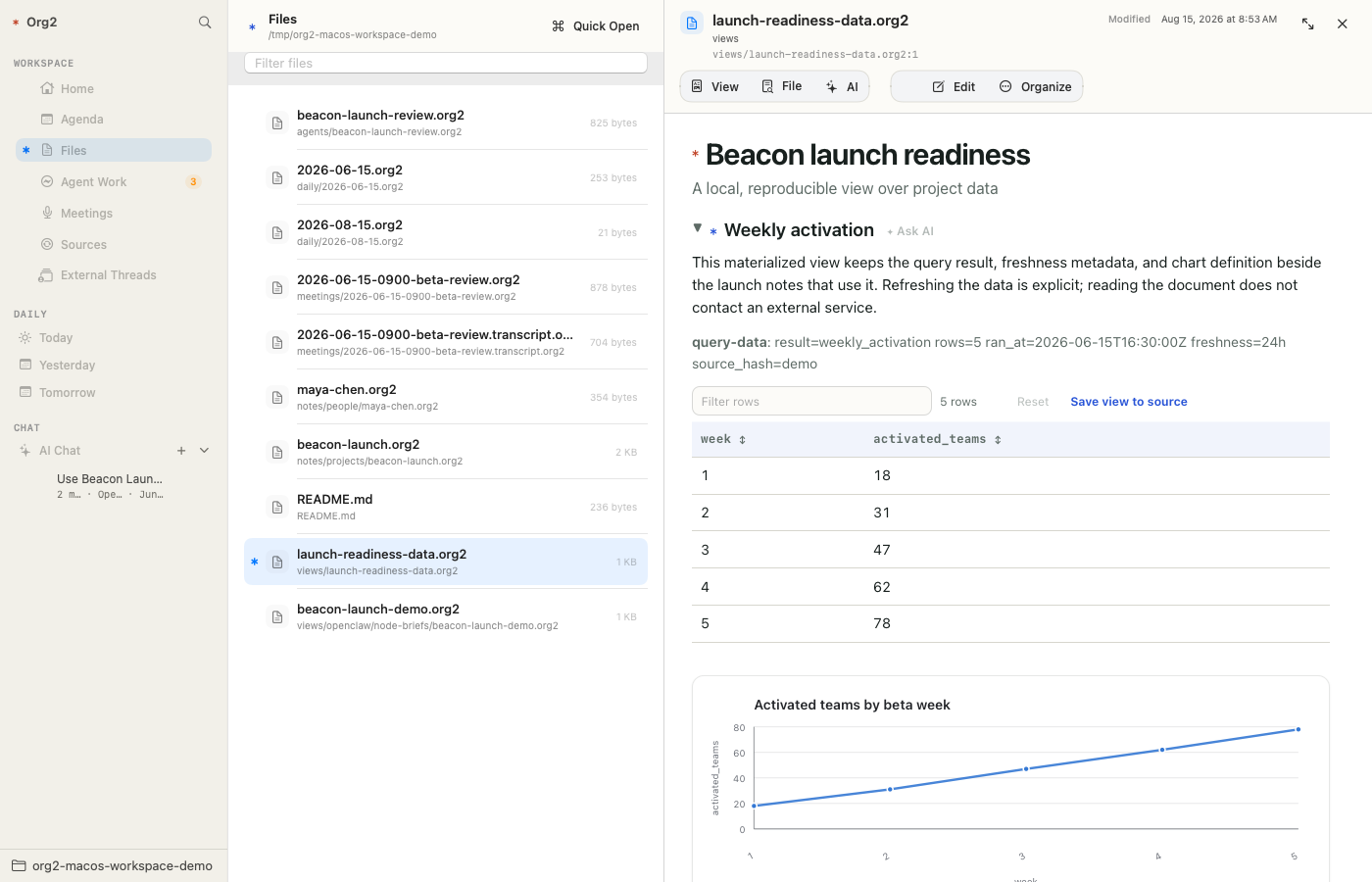
.org2,.org, Markdown, and CSV files, filter them, and quick-open a file with keyboard shortcuts. CSV links open in the detail pane as an editable table with a raw-text fallback; changes use the same autosave, Command-S, stale-write protection, and file undo path as the full-page editor.Search :: run literal, case-insensitive full-text search across
.org2and.orgfiles under the active corpus or all mounted corpora, then open corpus-qualified results with source context.Meetings :: record or import local audio, create meeting/transcript artifacts under the corpus, and keep transcription provenance in Org2 files.
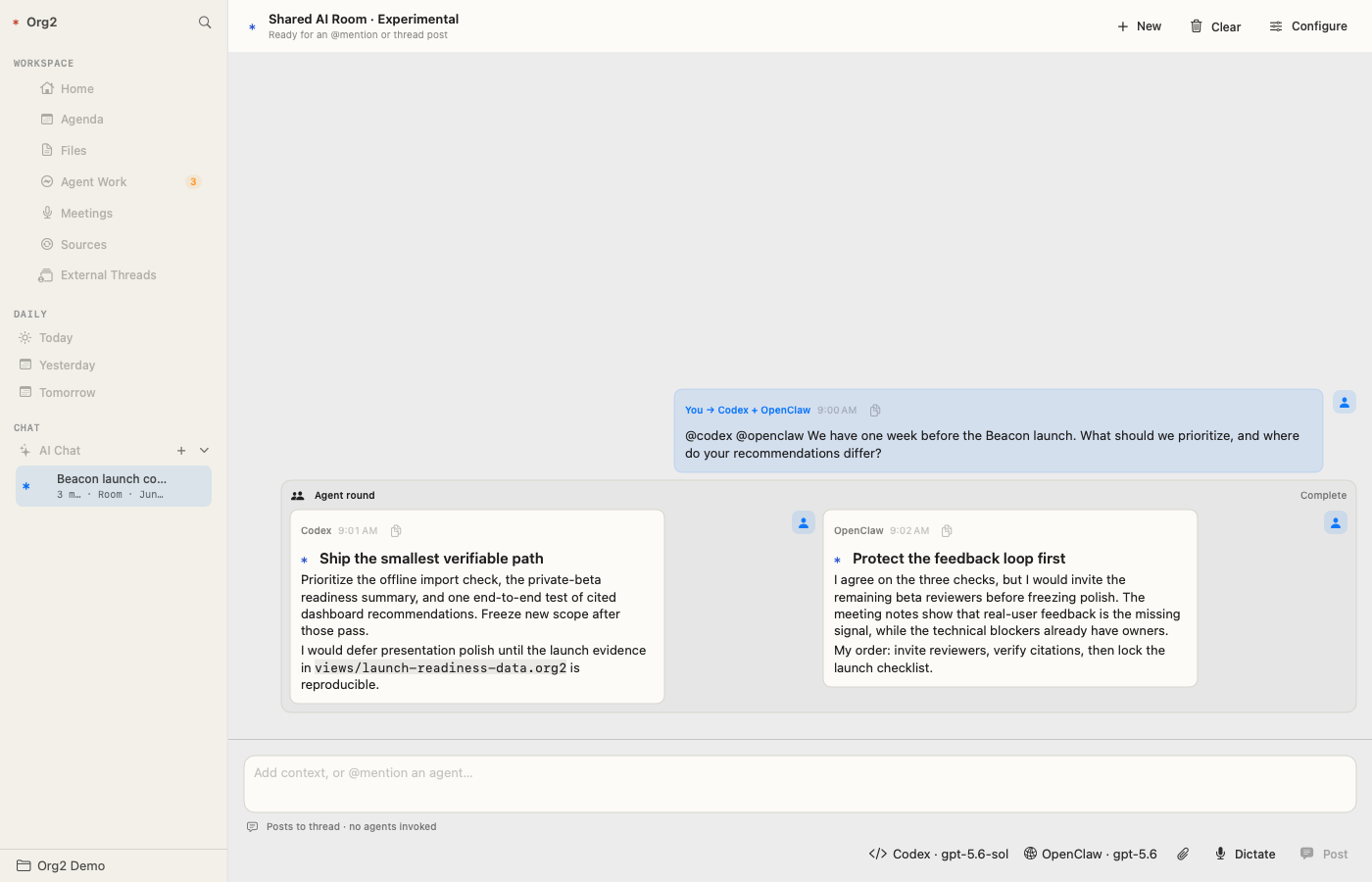
AI Chat :: send selected workspace context through a named local Codex, remote Codex App Server, or OpenClaw destination while keeping conversation state local to the app. A shared room can invoke any configured set with explicit
@mentionsor@all, group independently attributed answers into one agent round, and retain a separate model, progress state, and failure boundary per destination. OpenClaw Gateway protocol v4 provides streamed replies, connection/run state, tool and lifecycle activity, optional provider-exposed reasoning, and a Stop action; the OpenAI-compatible HTTP endpoint remains a compatibility fallback when the WebSocket protocol is unavailable. Live turn state is isolated from the general workspace model, and token/reasoning bursts publish to the typing indicator at most about 30 times per second, so streaming does not invalidate the sidebar, transcript, composer, and unrelated workspace surfaces for every token.External Threads :: browse recent native harness tasks without resuming or mutating them. The first provider is Codex App Server; the surface is harness-neutral so native OpenClaw and other providers can be added later. Org2 orders the catalog by latest activity and follows App Server pagination so an older, long-running task remains discoverable when it becomes active again. The filter matches the loaded task title, preview, workspace path, and source; it does not search transcript bodies. Org2 loads lightweight summaries first and fetches a full transcript only when selected. Save to Org2 writes a provenance-marked snapshot under
views/external-threads/, while Fork into Org2 creates a new local Codex chat with that snapshot staged as context; the external task remains read-only.
Global capture is available while the app is running. Cmd-Ctrl-Return opens a capture modal from anywhere on macOS, and the in-app Capture command uses the same path. Captures append to today's daily note, using roam.dailiesDir from org2.json when configured. The modal can write notes or TODOs, set TODO state, priority, tags, scheduled/deadline dates, and mark a capture ready for agent handoff. The paste control accepts text, URLs, local files, and pasted image data; local files and images are copied into attachments/ and linked from the capture.
The detail pane can render a selected file, agenda item, approval item, search result, backlink, meeting note, or agent thread. Read mode uses compiler-generated HTML; the Edit command opens the same entry or page in a native source editor.
CSV files use a dedicated detail surface instead of the Org renderer. The table view supports direct cell editing and adding or removing rows and columns, while Raw view preserves full-fidelity access to quoting and multiline values. Links to local CSV files stay inside the workspace rather than opening a separate application.
Detail chrome follows the same compact hierarchy across those resources: identity and pane controls stay together, related document commands share a quiet control strip, and metadata derived from Org2 properties is rendered as a lightweight bordered card. Controls reveal stronger fill on hover or press instead of presenting every command as a permanently boxed button. This keeps the compiler-rendered document visually continuous with its native workspace controls while preserving the ordinary source text as the underlying model.
Document editing
The writing surface is a native NSTextView over the selected Org2 entry or full page. It keeps normal macOS cursor movement, selection, IME, undo, and save behavior while layering Org2 commands over the visible text buffer.
Current source-editor affordances include:
idle-coalesced incremental syntax highlighting that keeps keystrokes ahead of presentation work, including on large files,
native macOS spelling and grammar checking for prose without automatic source-text correction,
parser-backed source ranges, heading navigation, folding, semantic region presentation, and inline diagnostics,
a semantic heading gutter with fold, TODO, priority, planning, reference, property, and structural actions,
Return continuation for unordered, ordered, checkbox, and indented list lines,
heading and list insertion, promotion and demotion, TODO cycling, scheduling, deadlines, property insertion, link insertion, and planning cleanup,
presentation-only heading folding that never changes the source text,
Command-S saving that keeps the editor open and refuses stale writes without discarding the draft.
Read mode is deliberately separate. It renders the selected entry or page as HTML from the shared compiler, including headings, links, property drawers, quotes, tables, citations, media, source blocks, and generated Org2 artifacts. Rendered content is used for reading, navigation, and workflow actions, not as an authoritative editable DOM. Following a link to another line in the active full page reuses that compiled document and scrolls within it instead of loading and rendering the file again.
Rendered tables have app-local view controls for filtering rows, sorting explicit header columns, resetting to source order, and resizing columns. Those operations are ephemeral and disappear when the document is reloaded. An editable full-file view also offers Save view to source: after a confirmation that states how many filtered rows will be removed, it preserves the header and original raw cell syntax while replacing the body with the visible row order. Source-editor previews and read-only entries do not offer that write action.
Explicit color: links render as non-navigating foreground and background bindings in paragraphs, headings, chat content, and table cells. For example, [[color:red][urgent]] colors text, [[color:bg=yellow][review]] highlights text, and [[color:fg=white;bg#b42318][blocked]]= binds both. A binding that occupies a whole table cell colors the cell background rather than drawing a small inline chip. Filtering, sorting, copying, and Save view to source continue to use the visible label and preserve the original link markup. The renderer never infers color from a column name or an unmarked word.
For legacy or pasted text containing tab-indented structural lines, read mode expands tabs in its rendering input and leaves the source file untouched. The canonical parser and editor diagnostics remain strict, so the source editor can still offer explicit tab cleanup without making preview availability depend on that cleanup.
Source editing can optionally show that HTML renderer in a resizable split view. The native text buffer and caret update immediately; SwiftUI publication, syntax presentation, parser-backed diagnostics and gutter state, and HTML rendering are separately coalesced behind progressively longer idle delays. The preview follows the source line near the caret, rejects stale render results, and can be paused. Typing never waits for HTML generation.
Document presentation is customizable without enabling document scripts. Use the document-layout menu to create or edit .org2/app.css at the corpus root; its CSS applies to read mode and the source preview. The app continues to exclude HTML_HEAD scripts and raw export HTML from its safe rendering profile.
Basic document PDF export
Any open .org or .org2 file can be saved as a straightforward PDF with File → Export Current Document as PDF… in the macOS menu bar or the document header's File menu. The app saves a pending edit, renders the entire file through the same safe HTML compiler and optional .org2/app.css used by read mode, resolves relative assets from the source file's directory, and opens the finished PDF in the default macOS viewer. This export does not require LaTeX.
The PDF uses a document-only print profile: file and heading property drawers,
generic drawers, fold controls, heading “Ask AI” actions, table view controls and resize handles,
and other app-only interaction chrome are omitted. The /export pdf command
uses the same clean, full-file export path.
Local PDF links in AI chat and rendered documents open inside the workspace in the native PDF reader. Relative links resolve against the active corpus, and the preview provides the same page-jump and zoom controls used by slide decks; the PDF is read directly rather than being sent through the Org2 parser or recompiled.
This is the basic reading-layout export. For a presentation that needs Beamer themes, overlays, speaker notes, or LaTeX-specific output, use the slide export commands below instead.
Slide preview and export
For a full .org or .org2 page, the app uses the shared compiler's presentation metadata to choose the right preview automatically: Beamer or slide-declared pages open as a compiled PDF, while ordinary notes stay in document view. View → Preview can still override that choice for the current file, or return it to Automatic; the override is scoped to that file instead of becoming a global app toggle. The source editor's split preview exposes the same per-file choice. Slide preview compiles the current in-memory draft after a short idle delay, so saving is not required before checking the deck. It resolves relative images from the source file's directory and writes no preview artifact into the corpus.
A compact control bar over the deck moves to the previous or next slide, accepts a slide number, and changes zoom without recompiling. Command-Plus and Command-Minus zoom in and out, and the percentage control returns to fit-to-window. Left Arrow, Page Up, and Shift-Space move backward; Right Arrow, Page Down, and Space move forward; Home and End jump to the first and last slide. These shortcuts yield to an active text field or source editor.
The app remembers the visible source line for each file and shares it across reading and source editing. Slide previews also retain their page number, so recompiling a deck after a local or agent-authored change keeps the current slide selected. A same-file source-line link moves the already compiled PDF to the nearest slide marker without recompiling the deck. Choosing Edit from a rendered document or compiled slide deck opens the editor at the source line nearest the current viewport or slide; closing the editor, changing document scope, navigating away and back, or reopening the app restores that file near the same place instead of returning to the top.
Preview compilation uses one LaTeX pass for responsiveness. A newer edit cancels the obsolete preview request, stale results are rejected, and the last valid PDF remains visible if the next draft does not compile. Pause stops both document and slide refreshes. The bounded error shown in the pane can be retried after the source is corrected.
Org2 Workspace can turn an open .org or .org2 talk into a Beamer PDF without leaving the app:
Open the talk in the document pane.
Choose File → Export Slides as PDF… from the macOS menu bar, or open the document header's File menu and choose the same command.
Choose the destination. The app saves any pending edit, compiles the entire source file, and opens the finished PDF in the default macOS PDF viewer. If macOS cannot open it automatically, the app confirms that the export still succeeded and shows the written path.
Choose Export Slides as LaTeX… instead when you want the intermediate .tex file for inspection, manual compilation, or further customization. LaTeX export confirms the written path without opening the file. Final PDF export uses two LaTeX passes so references, outlines, and overlays settle. Preview and both export commands use the same shared Org2 presentation model and Beamer renderer as org2 export beamer; Swift does not maintain a second slide parser.
PDF export requires a TeX installation that provides pdflatex. MacTeX installs it in /Library/TeX/texbin, which the app includes when resolving command-line tools. Relative image paths are resolved from the talk file's directory, so a reference such as [[file:images/architecture.png]] continues to work when the PDF is written elsewhere.
The familiar Org outline convention works without migration: with #+OPTIONS: H:2, level-one headlines are sections and level-two headlines are slides. Existing BEAMER_* properties remain accepted, while new talks may use backend-neutral SLIDE_* properties. See Language reference → Presentations for themes, columns, overlays, notes, image sizing, raw LaTeX escape hatches, and CLI examples.
For pdfLaTeX compatibility, the renderer translates common Unicode arrows, comparison operators, checkmarks, bullets, and dashes in headings, prose, metadata, and source/example blocks. Symbols such as →, ↘, ≥, and ✓ therefore do not require per-talk LaTeX declarations.
On failure, the app presents one bounded, actionable compiler summary rather than placing the complete LaTeX transcript in a native alert. Common fixes are:
confirm that an image path is relative to the talk and that the file exists,
export LaTeX to inspect the generated source,
run the CLI directly when a complete terminal transcript is useful,
add a required package with
#+LATEX_HEADER:when the talk uses custom LaTeX.
Data notebooks and charts
Files containing ```dataset and ```sql results...= blocks act as explicit data notebooks. The rendered view can refresh every named result through the shared org2 query-data backend, collect the provenance-stamped materialized tables, write the ordinary source file once after every query succeeds, and then render attached chart blocks once. A failed query leaves the source file unchanged. Merely opening or rendering a note never contacts a remote warehouse.
The current app workflow supports local/table datasets plus configured ClickHouse and Metabase profiles. For the Scarf Metabase workflow, the app stores the API key in the macOS Keychain, stores only non-secret profile configuration in org2.json, distinguishes configuration/authentication/query failures, and offers an explicit retry path. Native SQL datasets can identify the configured Metabase database without depending on a mutable saved question.
Interactive line, bar, and histogram charts remain compiler-described and app-presented: source controls deterministic size/height/sort settings, while the app provides nearest-point hover, exact-value tooltips, keyboard mark navigation, and resizable cards. Notes cannot inject arbitrary JavaScript, and static SVG remains the CLI/export fallback.
This is one place where the Mac app can take the Org tradition substantially further. Org tables, result blocks, and chart declarations remain readable and versionable as source, while the HTML-backed reading surface has room for dense layouts and interactions that would be awkward in a terminal-style buffer.
The app writes ordinary Org2 text. Users can inspect every change in Git or another editor.
External sources
The Sources surface manages Slack and Notion profiles declared in the active corpus's org2.json. It shows slacrawl/notcrawl archive health and counts, supports a no-write import preview, and runs Sync & Stage through the shared org2 source CLI. Profiles may declare an interval or daily schedule; while the app is running, the surface shows the normalized cadence, next automatic run, last attempt, and any actionable failure. The scheduler checks once per minute, catches up overdue work after wake or launch, and retries failed automatic runs after 15 minutes. Schedule intent remains portable in org2.json, while execution timestamps and errors remain machine-local. Staging writes bounded raw JSON under the configured rawZone and provenance-stamped, review-required Org2 packets under ingestion.reviewZone; it does not silently promote imported material into canonical notes. Source bodies are fixed-width quoted in review packets, so external headings, TODOs, property drawers, and similar text remain inert until deliberately promoted.
Machine paths and credentials remain outside the corpus. Local crawler bindings live under the machine's Org2 index home. A Notion API token entered in the app is stored in macOS Keychain and passed only to notcrawl for that operation. The surface can reveal the review directory so imported material can be inspected through Org2 Workspace, Git, or any text editor.
Meetings
Org2 Workspace records meetings as local corpus artifacts. A meeting write normally creates an audio file, a meeting note, and a transcript artifact under meetings/.
Transcription works out of the box through the bundled native whisper.cpp v1.9.2 runtime and English base.en model. Packaging includes, signs, and launch-tests its required dynamic libraries, so an app cannot advertise a bundled fast path that fails only when a meeting ends. It does not require Homebrew, a model download, environment variables, or Speech Recognition permission.
The app's Settings → Meetings tab makes the provider explicit and stores the selection in machine-local app preferences. Automatic uses launch-verified local Whisper and records any macOS Speech fallback diagnostic. Local Whisper pins that provider and exposes model-path and language overrides. Selecting Fluid Voice detects the installed app, enables and briefly relaunches its loopback Local API when needed, and verifies the connection; an already healthy instance is left untouched. The endpoint remains available under Advanced for a non-default local port. Org2 rejects non-loopback endpoints and divides long meetings into overlapping temporary chunks below the provider's five-minute request limit. macOS Speech selects Apple's recognizer directly. Custom Command accepts {audio} as the quoted file-path placeholder and reads the transcript from standard output. Explicit providers fail visibly rather than silently changing engines. Existing ORG2_WORKSPACE_WHISPER_* variables remain available for headless compatibility.
If every configured local transcriber is unavailable, Org2 still writes the meeting artifacts with :transcription_status: failed or unavailable, the selected engine, and the local error. Audio is never sent to a non-loopback endpoint by this feature.
Settings → AI Chat includes machine-local Meeting Automation. It can route every newly finished meeting to any enabled AI destination, either in a new thread per meeting or in one explicitly selected existing thread, using an editable processing prompt. Only the fresh successful local-transcription completion callback can emit this event. Enabling the hook, opening or refreshing Meetings, and relaunching the app never scan or replay existing meeting files; a failed or unavailable transcription does not dispatch. Each live completion carries a stable event identity so the callback can be observed more than once without creating a duplicate message.
This hook deliberately runs on the Mac that records and transcribes the meeting. Org2 Workspace must therefore be open and the Mac awake when capture finishes; there is no historical catch-up replay after a restart. Once one live meeting has been observed arriving exactly once, this event-driven hook can replace a polling OpenClaw meeting cron without moving capture or credentials to a server.
See Org2 meetings for the artifact shape and transcriber resolution order.
AI chat and agents
The native Org2 Workspace → Settings… window includes an Appearance pane with System, Light, and Dark themes; System follows the current macOS appearance. Its Documents pane contains machine-local reading preferences. The property-drawer toggle chooses whether heading property drawers start expanded or collapsed in rendered documents; individual drawers remain interactive, and the preference never rewrites the Org2 source. The AI Chat pane controls the default AI chat context, destinations, and notifications. AI Destinations assigns a unique name and @mention to any number of local Codex, remote Codex App Server, OpenClaw Gateway, OpenAI API, Anthropic API, OpenRouter, or Ollama targets. A remote Codex destination stores its WebSocket endpoint and the workspace path as seen on that machine. Direct model destinations store an editable API base URL and exact model ID; OpenAI, Anthropic, and OpenRouter require a user-supplied API key, while a default local Ollama server does not. Tokens and API keys use macOS Keychain and are never written to the corpus or transcript. The editor's explicit Test Connection action performs model discovery only after the person configures a destination; automated tests use an in-process mock transport and never require a live account. Direct model destinations can discuss the authorized Org2 context and receive image attachments, but have no filesystem, Org2 edit tools, agent harness, or external-action authority; use Codex or OpenClaw when work must be performed. Disabling a destination removes it from new-thread and autocomplete choices without breaking existing threads; a destination already referenced by a transcript cannot be deleted. Corpus access chooses between the current corpus and all loaded corpora; the app injects the exact authorized local and configured remote roots into each new turn so the runtime can retrieve cited context without gaining cross-corpus write authority. The same Settings pane accepts persistent custom instructions, which are labeled as user-authored instructions and included in every destination's turns. Its Message sound picker immediately previews each standard macOS sound when selected, can follow the system alert sound, and can mute AI-reply sounds. These settings are machine-local preferences and do not modify any corpus.
Agents and background jobs can post a result to an arbitrary existing thread with org2 thread post THREAD_ID --message TEXT --author NAME --agent-ref AGENT_REF --source REF --idempotency-key KEY --apply. This path does not submit, steer, or queue a model turn. The CLI atomically writes an append-only envelope to .org2/ai-chat-inbox/; the Mac app watches the inbox, merges each message on the main actor, persists it before acknowledging the envelope, reopens a settled destination, and uses the normal unread, sound, and push-notification behavior. An offline app drains pending envelopes when that corpus next opens. Stable message IDs make a retry safe even if the app stopped after transcript persistence but before envelope removal. Attributed background messages remain visibly labeled and are identified as another participant when included in later model context.
The Mobile Remote Settings pane can expose these Mac-hosted chat threads to the Org2 iOS app over Tailscale. The listener is off by default and accepts only a Tailscale IPv4 bind address on port 48922. A one-time QR or six-digit code pairs the phone and issues a revocable per-device credential stored in Keychain. The iOS Remote tab can list and open threads, create a chat for any enabled Mac-configured AI destination, autocomplete the same custom @mentions, fork a thread from either its list menu or in-thread menu, pin or unpin and settle or reopen threads from swipe actions or the in-thread menu, choose a destination-reported model and supported reasoning level, transcribe voice through iOS into the composer without forwarding audio to the Mac, resize and attach up to four photos, send messages, follow the live connection and work phase, stream replies, copy any message, and stop a live turn from the composer. Destination IDs, names, and message attribution travel additively in protocol v2, so an older paired client still sees the underlying Codex or OpenClaw runtime while an updated client distinguishes @codex-local from @codex-remote. Its External Threads browser uses the paired Mac as a read-only relay for the same recency-ordered, paginated native Codex catalog shown on the Mac; local search covers every loaded title, preview, workspace path, and source. Fork into Org2 stages a selected snapshot in a new writable Org2 thread. Opening a thread shows a full conversation loading state; recently viewed transcripts are kept in a small in-memory cache and shown immediately while the app refreshes them, which avoids repeated blank waits and expensive redraws for large idle chats. Scrolling above the latest content reveals a floating jump-to-bottom control; new streaming content follows automatically only while the reader remains near the bottom. Cited links use Org2's compact accent treatment instead of exposing their transport syntax. Tapping a cited .org2 or .org link opens the complete local synced file, preserves long source lines with horizontal and vertical scrolling, and moves to the cited line; when that local copy is unavailable, a paired Mac can provide the citation as a compatibility fallback. The iOS app's Browse Files action in the local corpus controls indexes readable text files in the selected Files-accessible corpus and filters names and paths on-device as the user types. Opening a local result does not require the Mac or Tailscale. Mac and iOS sends use the same selected-thread continuation envelope: a bounded excerpt of the local transcript plus deduplicated Org2 file references cited by that thread, supplementing the runtime's session cache. A turn submitted from iOS does not inherit the Mac app's current page, meeting, agenda, or search selection; a turn composed on the Mac may additionally include that visible selection. The Mac chat uses the same jump affordance when its saved scroll position is above the latest message. The Mac remains the executor for remote AI chat: it owns runtime credentials, corpus authorization, context assembly, transcript persistence, attachment validation, and write boundaries. The paired iOS Agenda, Approvals, and Workflows tabs also use the Mac's shared-CLI projections instead of maintaining separate mobile semantics. TODO transitions and approval decisions complete against canonical state before the phone updates; run approvals expose approve, reject, and request-changes boundaries, while workflows expose state changes and declared-input runs. If the Mac is unavailable, iOS retains its last canonical projection and reports the connection problem rather than replacing it with a contradictory local parse. Tailscale encrypts the transport; the app credential provides a second authorization layer inside the tailnet. The Mac must be awake with Org2 Workspace running. Model selection and photo transport use Mobile Remote protocol v2, so mismatched app versions are rejected rather than silently dropping an attachment.
Optional Reply notifications show a banner with no sound or badge; tapping one opens the corresponding thread. The Remote screen includes a test-notification action and links directly to iOS Settings when notification permission is disabled. The phone polls while Org2 is active and requests best-effort iOS background refresh while suspended, so iOS scheduling, a sleeping Mac, or an unavailable tailnet can defer a notification until the next refresh.
The New action creates an empty AI chat and preserves the previously selected destination. A compact destination picker beside the composer can choose any enabled local Codex, remote Codex, OpenClaw, or direct model target until the first message is sent; it then locks for the life of the thread. Adjacent model and, when supported, reasoning pickers use that destination's catalog, remain editable between turns, and persist their optional per-thread overrides with the local transcript. Choosing Default clears the override and inherits the destination's configured value. OpenClaw applies explicit choices through sessions.patch before chat.send and therefore requires the live Gateway and its operator.admin session-mutation scope when an override is set. Inherited-default turns do not patch the session and keep the narrower read/write socket scopes. Codex passes the selected model and supported reasoning effort to its App Server turn. Direct providers send the configured model ID through their native HTTPS chat contract; Ollama uses its native local /api/chat contract. OpenClaw retains the Gateway, lifecycle, command-discovery, and durable-run behavior described below. A local Codex destination launches a long-lived local Codex App Server process; a remote destination speaks the same protocol over its configured ws: or wss: endpoint. Both stream through the same transcript and progress UI, but retain independent external thread IDs. The configuration sheet uses Codex-managed Sign in with ChatGPT for the built-in local destination; Org2 neither copies nor stores the ChatGPT credential, and an API-key-authenticated Codex session is rejected with an explanation so the subscription-backed path cannot silently incur separate API billing. Each local transcript stores its exact destination ID, optional model/reasoning overrides, and per-destination external OpenClaw session or Codex thread identity.
Actions that invoke an agent with generated instructions—such as discussing an approval, running or continuing a workflow, resuming a durable run, briefing a node, summarizing a meeting, importing an external thread, or handing off an assigned backlog—keep that automatic payload behind a context pill. Only text authored by the person appears directly in the user message. Removing the pill removes the complete generated payload; copying the message copies the pill label and user text without exposing the hidden system context. The exact payload is still sent to the selected destination, and the iOS Remote transcript uses the same presentation.
The experimental New Shared Room option keeps any configured AI destinations and the user in one visible local transcript. Ordinary posts add context without starting agent work. Explicit custom mentions such as @codex-local, @codex-remote, or @research-agent request only those destinations; @all expands visibly to every enabled participant in that room. The older @both spelling remains accepted as an input alias. The composer previews that routing before send and offers destination-aware mention completion while typing; Return or Tab accepts the highlighted destination and leaves the insertion point after the completed mention. Mentioning a different destination from an ordinary single-agent thread automatically forks its current transcript into a new shared room, leaves the source thread unchanged, and sends the message only to the mentioned destination. An explicit Fork Thread action instead copies the current transcript into an independent thread of the same kind, with fresh provider/session identity so later turns cannot mutate or resume the source conversation. Each destination has its own model picker, external thread/session ID, attribution, live state, and failure boundary, so two Codex machines never collapse into one reply slot. A multi-agent request appears as one anchored agent round with a separate reply or live status for each requested destination, arranged side by side when space permits and stacked in narrower layouts. Context posted while a round is active joins the room without changing any in-flight prompt. Agents may propose an explicit handoff, but Org2 does not silently loop them or synthesize their answers.
Local dictation is bound to the AI thread, draft, corpus authorization, and visible context that were active when recording began. Switching threads while transcription runs does not redirect the resulting message. When Codex or OpenClaw is already working, ordinary sends queue behind the active turn instead of changing its instructions. Cmd-Shift-Return explicitly steers the active turn immediately, and the adjacent delivery menu offers the same Steer Now action. Until a queued follow-up becomes the active provider request, its bubble can steer immediately, move back to the composer for editing, or be removed without sending. The active request continues to use the existing stop control. iOS exposes the same steering action while a response is active and offers Queue as Follow-up from the send button's context menu.
Codex permissions are configurable in Settings → AI Chat: Read Only, Workspace Write, or opt-in Full Access. Workspace Write is the default and limits shell writes to the active corpus; Codex protects .codex state even in that mode, so workflows that must acquire a Codex-owned lease under ~/.codex require Full Access. Full Access also removes the broader filesystem sandbox and should be enabled only for trusted threads. The selected policy is applied on every turn, including resumed threads. Codex also receives three client-side tools: org2_workspace_read, org2_workspace_patch_preview, and org2_workspace_patch_apply. Corpus edits continue to use those tools so they reuse the Mac app's turn-origin corpus guard and the same unsaved-editor-aware, SHA-bound preview/apply broker used by the optional OpenClaw local-edit node. When Settings authorizes all loaded corpora, the read tool accepts only an exact local root from that turn's authorized snapshot; preview and apply continue to target only the active corpus. Once a turn starts, its context, transcript writes, authorized read roots, and write root remain bound to that snapshot even if the visible workspace switches. This keeps exact change attribution local even when another thread, sync, or background job changes the corpus concurrently. Clearing a Codex transcript also clears its external thread ID so the next message starts a genuinely new model history. Codex chat does not pass through the OpenClaw Gateway and does not automatically create OpenClaw lifecycle runs or use its scheduled/integration surfaces.
The app includes OpenClaw chat for sending messages with current workspace context. It prefers OpenClaw Gateway protocol v4 over a native WebSocket connection and uses the configured bearer token for the Gateway handshake. The accepted run ID, connection state, streamed reply, provider-exposed progress, and structured tool events appear together in the in-progress transcript card. OpenClaw progress is accepted from both normalized item/preamble events and native assistant/commentary streams, including after reconnecting to an accepted run. One dynamic status line conveys connecting, thinking, tool work, fallback, or interruption without separate Live and Working labels. The card presents a bounded, plain-language approach and activity summary: result envelopes and raw JSON remain diagnostic data, search arguments become readable descriptions, repeated low-information tool events are grouped instead of overflowing the transcript, and isolated recoverable tool failures do not turn the activity summary red. The work log is saved with the assistant reply, stays compact by default, and can be expanded to review the retained feed. The Stop control sends chat.abort for the accepted run. If the Gateway WebSocket cannot be reached or negotiated, that turn falls back to the existing OpenAI-compatible HTTP endpoint and clearly labels the reduced-observability mode.
Gateway chat turns are restart-safe. Before submitting a turn, the app atomically saves the exact request, attachments, start time, and idempotency key in the local transcript. If the app is hard-quit while OpenClaw is working, reopening the workspace reconnects with that same key and enters the Gateway's durable wait/history path for every accepted acknowledgement instead of waiting for a one-time final event that may already have passed. Reconciliation follows a replacement active run when OpenClaw continues work under a new run ID, retains newly observed activity, resolves an in-flight or already-completed turn, and saves one assistant reply without starting the work twice. Messages queued behind that turn remain queued and resume in order. Legacy or HTTP-compatibility sends without durable Gateway metadata still reopen as interrupted and require an explicit retry.
The repository also ships the native org2-lifecycle plugin under integrations/openclaw/. It records substantial OpenClaw main-agent turns, subagent executions, and cron work in the same durable run model shown by Agent Work. It also prepares manual workflow runs before execution and reconciles enabled schedules from canonical workflow files into OpenClaw cron. See Getting started for the install path and Workflows for the ownership boundary.
Remote Gateways normally require a paired device identity before granting operator.read and operator.write. Save & Request Pairing in OpenClaw configuration creates a stable Ed25519 device identity in the macOS keychain and opens a Gateway pairing request. Approve the displayed request ID on the Gateway host; the next request can then use the live protocol. Until approval, normal chat continues over the HTTP compatibility endpoint without replaying an already-accepted Gateway run.
OpenClaw configuration can also enable Read and apply Org2 edits on this Mac. This starts a separate, narrowly scoped OpenClaw node connection from the app. The node exposes only org2.workspace.read, org2.workspace.patch.preview, and org2.workspace.patch.apply; it does not expose system.run or a general filesystem command. Existing-file edits must read the effective local document, including the selected editor's unsaved draft, preview a whole-file replacement against its SHA-256, and then apply that exact preview before it expires. Apply rechecks every input before writing, confines paths to the corpus where the turn began, preserves the app's normal recovery behavior, and returns the exact changed-file summary attached to that response.
Local edits are off by default and require node-role pairing in addition to operator pairing. The Gateway must have the checked-out org2-lifecycle plugin loaded because it registers the three typed commands with OpenClaw's node policy; the selected agent must also have the nodes tool enabled. Approve the pending node in the Gateway's Nodes view after enabling the setting. When the node is connected, the Mac app tells that chat turn to use the typed node instead of Gateway filesystem tools. Change attribution comes from the successful local apply result rather than a before/after corpus snapshot, so concurrent threads, syncs, and background jobs are not folded into that response's diff. If the local node is disabled or unavailable, the existing Gateway execution and filesystem-observation path remains in effect.
The progress feed only shows reasoning content that OpenClaw and the selected provider intentionally expose. It is not a promise of private or hidden chain-of-thought data, and it remains absent when the provider or Gateway does not emit a reasoning stream.
The chat composer sends with Return, inserts a newline with Cmd-Return, and sends as an immediate steer with Cmd-Shift-Return while a turn is active. Files and images selected with the attachment button or dragged onto the composer become removable attachment chips instead of local path text; dragged bitmap data is accepted even when the source does not expose a file URL. The live Gateway accepts image, audio, PDF, text, archive, and office-document attachments up to 20 MB, while video is rejected and non-image files do not use the reduced HTTP-compatibility fallback. Adding a page, entry, headline, or rendered block as explicit context places a human-readable pill above the draft; multiple context items can be attached to one message, while stable file and line references remain in the agent-facing prompt instead of cluttering the conversation with opaque identifiers. In Files, Runs, and Review, Command-click toggles items and Shift-click selects a range; right-clicking any item in that selection and choosing Start New AI Thread creates a fresh thread with the complete set staged as context. Agenda uses its existing bulk selection and exposes the same thread action in both the row menu and bulk action bar. The shared OpenClaw/Codex harness instructs both runtimes to structure answers with Org2 syntax instead of Markdown: star headings, non-nested Org emphasis and links, and table hlines whose column joins use +, such as |---+---|. Markdown file links remain a deliberate chat-transport exception so cited file/line references stay clickable. Pills resolve legacy opaque references to the page title, abbreviate long labels until hover, expand with a short animation, and open the cited source line when clicked. Draft pills reveal a remove control on hover; sent messages retain linked, non-editable pills as an accurate record of the context the agent received. Transcript text supports partial drag selection within each message, and each message has a subtle hover-revealed copy control for copying that message alone. Per-message selection keeps long lazy transcripts responsive without disabling ordinary text selection. The Dictate control records a short local microphone note, transcribes it with the provider selected under Settings → Meetings, and sends the transcript as a normal OpenClaw message. The default Automatic provider uses launch-verified local Whisper and retains macOS Speech as a diagnosed fallback.
Sent attachment thumbnails are interactive for both user and assistant messages. Clicking an image opens a large aspect-fitted preview; PDFs use the native continuous-page reader, and text-like files open in a selectable monospaced view. The sheet can be dismissed with its close button or Escape, and attachment bytes remain inside the local chat transcript rather than being copied into temporary preview files.
For ordinary chat turns, the app also injects a non-secret snapshot of the active corpus's declared source profiles, including their IDs, types, scopes, readiness, raw/review zones, and reported mirror freshness. OpenClaw uses the corpus declaration and org2 source list/status as the authority for connected material, searches the declared zones as ordinary Org2 text, and refreshes a matching enabled profile when fresher material is needed. It asks the user about setup only when org2 source doctor reports a specific missing machine-local binding or credential.
Typing / opens a discoverable command menu. Use the Up and Down arrow keys to move through its suggestions and press Return or Tab to complete the highlighted command and continue typing after it; clicking a command still completes it directly. Commands that only need compiler or app state run locally and leave their result in the chat transcript; commands marked Agent are expanded into a scoped request and sent with the selected document context.
The command menu also scans the active corpus's immediate .agents/skills/*/SKILL.md directories. Skills whose frontmatter does not set user-invocable: false are labeled Skill, use their declared name and description in autocomplete, and are forwarded with any typed arguments to the thread's selected OpenClaw or Codex runtime. This local catalog refreshes when the corpus or chat selection changes and when the command menu opens, so corpus-owned skills remain discoverable even while the OpenClaw Gateway is offline. Switching corpora switches the skill catalog; mounted secondary corpora do not implicitly contribute commands.
When the live Gateway is available, the app calls commands.list for the selected agent and merges OpenClaw's runtime-native, skill, and plugin commands into the same menu. Those commands are labeled OpenClaw and are sent to chat.send exactly as typed, without the Org2 context envelope. Commands absent from the most recently discovered catalog are also forwarded so a newly installed command can work before the cache refreshes; OpenClaw remains the authority that validates and authorizes them. Gateway slash commands do not fall back to the OpenAI-compatible HTTP endpoint. Begin a message with // to send a literal leading slash as ordinary chat text.
The first command set is:
/help,/search QUERY,/open PATH,/today, and/agendafor discovery and navigation,/related,/spellcheck, and/lintfor deterministic document/corpus checks,/export pdf|htmlfor a save-panel export of the current document,/publish preview [PROJECT](or/publish [PROJECT]) for configuredorg2.jsonpublishing,/briefand/summarizefor agent-assisted, citation-aware reading of the current document.
/spellcheck checks parser-identified headline and paragraph prose, avoiding source blocks, tables, properties, planning lines, and other syntax regions. It reports possible corrections without rewriting the source. Export and publish reuse the shared renderer/CLI; the chat surface is orchestration, not a second language implementation. Provider-specific external publishing destinations are intentionally left for later adapters.
This is deliberately a handoff boundary. The corpus stores selected context, transcript references, generated artifacts, and durable outputs; the external agent can act on that context without the Mac app becoming the only source of truth. Generated work stays in normal corpus zones such as views/ or compiled/ until a person reviews or promotes it.
The chat list treats threads as an inbox. Active threads appear first in an information-dense two-line row; hovering exposes Settle. Settling moves the intact conversation into a visually subdued Settled section, and Reopen returns it to active work. Quick Open and Search still include settled titles and messages, and opening one restores its original session, context, and handoff behavior. The OpenClaw configuration sheet can disable automatic settling or choose an inactivity interval. That policy and each settledAt transition live in the active corpus's .org2/openclaw-chat.json, so the CLI and other runtimes see the same state. Auto-settlement skips the currently selected, pinned, unread, or pending thread and any thread whose latest delivery is still sending, failed, or interrupted. Empty threads and recovered failures can settle, while an orange warning badge keeps unresolved delivery work visible.
Org-crypt
The app includes configuration and run actions for GPG-backed :crypt: subtrees. It can encrypt plaintext :crypt: subtrees on save, decrypt selected encrypted subtrees for review, manage recipient lists, and use the macOS keychain for the optional passphrase workflow.
Search and knowledge creation
The Search surface calls org2 search for one corpus or org2 workspace search with every mounted path for an all-corpora read. Recursive filesystem watchers observe the active corpus and mounted corpora. Active-corpus changes update only the changed files in the file list, node resolver, and disposable search index; the app falls back to a complete scan only for configuration changes or when macOS reports dropped filesystem events. Each change marks only dependent workspace surfaces stale. The visible surface refreshes after a short coalescing delay, hidden surfaces refresh when opened, and the selected document reloads from disk without discarding an in-progress edit. All-corpora Agenda and Search views also react to changes in non-active mounts. Watchers continue collecting cheap path notifications while the app is inactive, but parsing and projection work waits until it returns to the foreground. Agenda is additionally invalidated at local midnight. Searches use relevance-ranked candidates, one line of context, and JSON output; the app displays at most 50 corpus-text results. Active TODO matches lead, followed by file and chat-thread names, then first-class approval, run, workflow, goal, and agent-profile matches before pages, entries, chat messages, and raw corpus text. Historical approval decisions remain searchable through their containing durable run even after they leave the actionable Review queue; selecting one opens that run. Within a result kind, an exact heading match leads a heading substring match, which leads a deeper body match. Repeated matching lines under the same active TODO collapse to one result. This is literal text lookup, not semantic/vector search: it matches case-insensitive text in normal .org2 and .org files, plus the structured fields of active-corpus Agent Work records, and returns cited file/line snippets or the corresponding durable record. Federated corpus-text results also carry portable corpus identity. Archive files and directories stay excluded.
The same surface includes a New Node action for creating an ID-backed Org2 note in the configured roam/index directory. It belongs with search and backlinks because node creation is part of navigating and extending the knowledge graph. Cmd-P / Cmd-K opens the faster Quick Open sheet, which fuzzy-matches both corpus file paths and AI chat thread titles; selecting a chat result opens that conversation directly.
Opening a person page through Quick Open or normal navigation adds a compact Action items panel above the document. It shows a bounded list of active items and recent completions that are directly linked or assigned to the person, plus otherwise-unlinked TODOs inside meetings that link to that person. Rows open the cited source entry. This is a cached corpus query, not an AI brief, so it appears without waiting for a model turn and does not rewrite the person page.
The next knowledge-browser work should make this more useful by adding graph-neighborhood views, link insertion, backlink-driven navigation, and broken-link repair.
Keyboard model
The app has global navigation shortcuts for major surfaces and local keyboard loops for agenda/document work.
High-value shortcuts include:
Cmd-1throughCmd-5for primary surfaces,Cmd-6for AI Chat,automatic event-driven refresh for the visible workspace view, refresh-on-open for hidden stale views, foreground reconciliation after wake, and a low-frequency safety check for durable runs and approvals; the selected document is checked by content so a sync tool that preserves timestamps or atomically replaces a file cannot leave an old preview cached,
the global toolbar Refresh or
Cmd-Rremains a recovery control for forcing a complete reconciliation of agenda, meetings, files and indexes, assigned work, approvals, durable runs, agent threads, and the selected document; it reloads the selected document first, while the rest of reconciliation continues. While it runs, the same control becomesCancel Refresh, and the app automatically stops the refresh after 15 seconds while preserving the previously loaded workspace data,document loading and rendering surfaces expose
Stop Waitingimmediately and replace a stalled preview with a retryable error after 15 seconds, so a single problematic page cannot leave its detail pane stuck indefinitely,Cmd-P/Cmd-Kfor quick open across corpus files and AI chat thread titles; matching is debounced and runs away from the main UI thread, while the current results remain stable until the new result set is ready,Cmd-Ctrl-Returnfor system-wide capture while the app is running,Cmd-7,Cmd-8, andCmd-9for today/yesterday/tomorrow daily notes,agenda-local
j/knavigation,/filtering, and TODO/planning shortcuts,Cmd-Option-ReturnandCmd-Option-Lfor heading and list insertion in source editing,Cmd-Option-Left/Rightfor promote/demote andCmd-Option-Up/Downfor heading navigation,Cmd-Option-Tfor TODO cycling andCmd-Option-S/Dfor scheduling or deadlines,Cmd-Option-[/Cmd-Option-]for current-heading fold and expand all,Cmd-Kwhile the source editor is focused for link insertion.
Use the in-app keyboard shortcuts sheet for the full current map.
Build and run
From the repository root:
npm install
npm run build
cd apps/macos/Org2Workspace
swift run Org2Workspace
The app expects dist/cli.js and dist/parse.js to exist. If the app cannot find the repo root automatically, set ORG2_REPO_ROOT before launching:
ORG2_REPO_ROOT=/path/to/org2 swift run Org2WorkspaceTo refresh the public macOS screenshots from the synthetic demo corpus:
npm run screenshots:macosNext priorities
The lead priority is deepening the workflow lifecycle over canonical plain-text files: clearer revision and diff handling, stronger parameterization assistance when saving a run, execution history and schedule health, and additional runtime adapters over the same workflow/run contract.
Mac quick capture intentionally appends to today's daily note. Refile remains available in the shared CLI as an organizational escape hatch, but linked daily notes reduce the need to make physical movement the primary capture model. Mobile may use an isolated intake file when its synchronization transport cannot safely share the actively edited daily note; that transport boundary does not redefine the desktop corpus model.
Meeting promotion, knowledge browsing, broader data-source configuration, capture templates, and packaging can proceed when they preserve shared write semantics. Meeting promotion should create ordinary TODOs and notes. The knowledge browser should reuse IDs and backlinks, data refresh should remain explicit and provenance-stamped, and packaging should verify the same CLI and parser artifacts the app calls.